> ## Documentation Index
> Fetch the complete documentation index at: https://mintlify.com/Steema/TeeGrid-VCL-FMX-Samples/llms.txt
> Use this file to discover all available pages before exploring further.

# TeeGrid Documentation

<div className="relative bg-gradient-to-br from-[#4b6d9e] via-[#5a7fb8] to-[#e77c38] dark:from-[#1a2332] dark:via-[#2d3f5f] dark:to-[#4b6d9e] py-20 px-4 overflow-hidden">
  <div className="absolute inset-0 bg-[url('/grid.svg')] opacity-10" />

  <div className="max-w-6xl mx-auto relative z-10">
    <div className="grid lg:grid-cols-12 gap-8 items-center">
      <div className="lg:col-span-7 space-y-6">
        <h1 className="text-5xl md:text-6xl font-bold text-white leading-tight">
          Lightweight Grid Control for Delphi
        </h1>

        <p className="text-xl text-white/90 max-w-2xl">
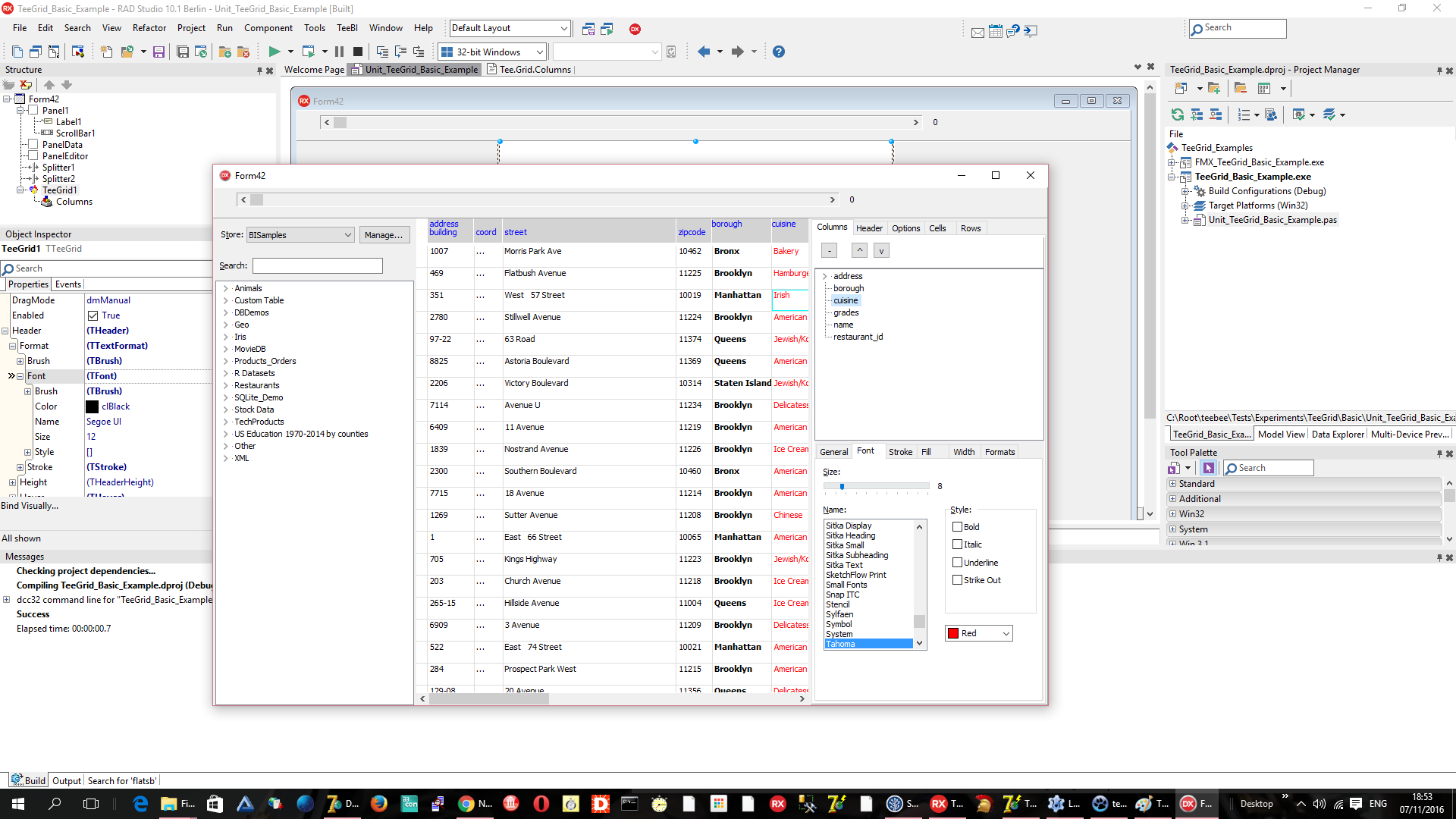
          Build powerful data grids with TeeGrid — a full-featured, cross-platform grid component for VCL and FireMonkey. Just 10K lines of pure Pascal code.
        </p>

        <div className="flex flex-wrap gap-4 pt-4">
          <a href="/quickstart" className="inline-flex items-center px-6 py-3 bg-white text-[#4b6d9e] font-semibold rounded-lg hover:bg-gray-100 transition-colors no-underline">
            Get Started

            <svg className="ml-2 w-4 h-4" fill="none" stroke="currentColor" viewBox="0 0 24 24">
              <path strokeLinecap="round" strokeLinejoin="round" strokeWidth={2} d="M13 7l5 5m0 0l-5 5m5-5H6" />
            </svg>
          </a>

          <a href="/api/teegrid" className="inline-flex items-center px-6 py-3 bg-white/10 text-white font-semibold rounded-lg border border-white/30 hover:bg-white/20 transition-colors no-underline">
            API Reference
          </a>
        </div>
      </div>

      <div className="lg:col-span-5 hidden lg:block">
        <div className="relative">
          <div className="absolute inset-0 bg-gradient-to-r from-[#e77c38]/20 to-[#aecae4]/20 blur-3xl" />

          <img src="https://raw.github.com/Steema/TeeGrid/master/docs/img/TeeGrid_VCL.png" alt="TeeGrid VCL Screenshot" className="relative rounded-lg shadow-2xl" noZoom />
        </div>
      </div>
    </div>
  </div>
</div>

<div className="mt-16 mb-16 max-w-5xl mx-auto px-6">
  <h2 className="text-3xl font-bold text-gray-900 dark:text-white mb-4">Quick Start</h2>

  <p className="text-base text-gray-600 dark:text-gray-400 mb-8">
    Get up and running with TeeGrid in just a few steps
  </p>

  <Steps>
    <Step title="Install TeeGrid">
      Download the latest version from the [Steema website](https://www.steema.com/downloads/gridvcl) or clone the repository. TeeGrid supports RAD Studio, Delphi, C++ Builder, and Lazarus FreePascal.

      ```bash theme={null}
      git clone https://github.com/Steema/TeeGrid-VCL-FMX-Samples.git
      ```
    </Step>

    <Step title="Add TeeGrid to your project">
      For VCL applications, add `VCLTee.Grid` to your uses clause. For FireMonkey, use `FMXTee.Grid`.

      ```pascal theme={null}
      uses
        VCLTee.Grid, Tee.GridData.DB;
      ```

      Drop a `TTeeGrid` component onto your form from the component palette.
    </Step>

    <Step title="Bind your data">
      Connect TeeGrid to any data source — TDataSet, arrays, lists, or custom virtual data.

      ```pascal theme={null}
      // Connect to a dataset
      TeeGrid1.DataSource := FDQuery1;

      // Or bind to an array
      type
        TPerson = record
          Name: string;
          Age: Integer;
        end;

      var
        People: TArray<TPerson>;
      begin
        TeeGrid1.Data := TVirtualArrayData<TPerson>.Create(People);
      end;
      ```

      Your grid is now ready to display and edit data.
    </Step>
  </Steps>
</div>

<div className="mt-16 mb-16 max-w-5xl mx-auto px-6">
  <h2 className="text-3xl font-bold text-gray-900 dark:text-white mb-4">Explore TeeGrid</h2>

  <p className="text-base text-gray-600 dark:text-gray-400 mb-8">
    Discover what you can build with TeeGrid's powerful features
  </p>

  <CardGroup cols={3}>
    <Card title="Data Binding" icon="database" href="/concepts/data-binding">
      Connect to DataSets, arrays, lists, or create custom virtual data sources
    </Card>

    <Card title="Cell Editing" icon="pen" href="/features/cell-editing">
      Built-in editors with support for custom editor controls
    </Card>

    <Card title="Themes" icon="palette" href="/features/themes">
      Customizable visual themes and rendering for any look and feel
    </Card>

    <Card title="Hierarchical Data" icon="sitemap" href="/features/hierarchical-data">
      Display master-detail relationships and nested data structures
    </Card>

    <Card title="Sorting & Selection" icon="sort" href="/features/sorting">
      Built-in sorting, filtering, and flexible selection modes
    </Card>

    <Card title="High Performance" icon="gauge-high" href="/examples/performance">
      Virtual mode for blazing-fast rendering of millions of rows
    </Card>
  </CardGroup>
</div>

<div className="mt-16 mb-16 max-w-5xl mx-auto px-6">
  <h2 className="text-3xl font-bold text-gray-900 dark:text-white mb-4">Framework Support</h2>

  <p className="text-base text-gray-600 dark:text-gray-400 mb-8">
    TeeGrid works across all major Delphi frameworks and platforms
  </p>

  <div className="grid grid-cols-1 md:grid-cols-3 gap-6">
    <a href="/frameworks/vcl" className="group block rounded-2xl border border-gray-200 dark:border-[#27272a] hover:border-[#e77c38] dark:hover:border-[#e77c38] transition-colors overflow-hidden no-underline">
      <div className="p-6">
        <h3 className="text-lg font-semibold text-gray-900 dark:text-white mb-2 flex items-center">
          <svg className="w-6 h-6 mr-2 text-[#e77c38]" fill="none" stroke="currentColor" viewBox="0 0 24 24">
            <path strokeLinecap="round" strokeLinejoin="round" strokeWidth={2} d="M9 17V7m0 10a2 2 0 01-2 2H5a2 2 0 01-2-2V7a2 2 0 012-2h2a2 2 0 012 2m0 10a2 2 0 002 2h2a2 2 0 002-2M9 7a2 2 0 012-2h2a2 2 0 012 2m0 10V7m0 10a2 2 0 002 2h2a2 2 0 002-2V7a2 2 0 00-2-2h-2a2 2 0 00-2 2" />
          </svg>

          VCL
        </h3>

        <p className="text-sm text-gray-600 dark:text-gray-400">
          Native Windows components for Win32 and Win64 applications
        </p>
      </div>
    </a>

    <a href="/frameworks/firemonkey" className="group block rounded-2xl border border-gray-200 dark:border-[#27272a] hover:border-[#e77c38] dark:hover:border-[#e77c38] transition-colors overflow-hidden no-underline">
      <div className="p-6">
        <h3 className="text-lg font-semibold text-gray-900 dark:text-white mb-2 flex items-center">
          <svg className="w-6 h-6 mr-2 text-[#e77c38]" fill="none" stroke="currentColor" viewBox="0 0 24 24">
            <path strokeLinecap="round" strokeLinejoin="round" strokeWidth={2} d="M3.055 11H5a2 2 0 012 2v1a2 2 0 002 2 2 2 0 012 2v2.945M8 3.935V5.5A2.5 2.5 0 0010.5 8h.5a2 2 0 012 2 2 2 0 104 0 2 2 0 012-2h1.064M15 20.488V18a2 2 0 012-2h3.064M21 12a9 9 0 11-18 0 9 9 0 0118 0z" />
          </svg>

          FireMonkey
        </h3>

        <p className="text-sm text-gray-600 dark:text-gray-400">
          Cross-platform UI for Windows, macOS, Linux, iOS, and Android
        </p>
      </div>
    </a>

    <a href="/frameworks/lazarus" className="group block rounded-2xl border border-gray-200 dark:border-[#27272a] hover:border-[#e77c38] dark:hover:border-[#e77c38] transition-colors overflow-hidden no-underline">
      <div className="p-6">
        <h3 className="text-lg font-semibold text-gray-900 dark:text-white mb-2 flex items-center">
          <svg className="w-6 h-6 mr-2 text-[#e77c38]" fill="none" stroke="currentColor" viewBox="0 0 24 24">
            <path strokeLinecap="round" strokeLinejoin="round" strokeWidth={2} d="M10 20l4-16m4 4l4 4-4 4M6 16l-4-4 4-4" />
          </svg>

          Lazarus
        </h3>

        <p className="text-sm text-gray-600 dark:text-gray-400">
          FreePascal support for Windows, Linux, and other platforms
        </p>
      </div>
    </a>
  </div>
</div>

<div className="mt-16 mb-16 max-w-5xl mx-auto px-6">
  <h2 className="text-3xl font-bold text-gray-900 dark:text-white mb-4">Key Features</h2>

  <p className="text-base text-gray-600 dark:text-gray-400 mb-8">
    Everything you need for modern data grid applications
  </p>

  <div className="grid grid-cols-1 md:grid-cols-2 gap-6">
    <div className="p-6 rounded-xl border border-gray-200 dark:border-[#27272a] bg-white dark:bg-[#1a1d27]">
      <div className="flex items-start">
        <div className="flex-shrink-0">
          <div className="flex items-center justify-center w-12 h-12 rounded-lg bg-[#e77c38]/10 text-[#e77c38]">
            <svg className="w-6 h-6" fill="none" stroke="currentColor" viewBox="0 0 24 24">
              <path strokeLinecap="round" strokeLinejoin="round" strokeWidth={2} d="M13 10V3L4 14h7v7l9-11h-7z" />
            </svg>
          </div>
        </div>

        <div className="ml-4">
          <h3 className="text-lg font-semibold text-gray-900 dark:text-white mb-2">Lightweight & Fast</h3>

          <p className="text-sm text-gray-600 dark:text-gray-400">
            Just 10K lines of pure Pascal code compiles to \~100KB. Virtual mode handles millions of rows effortlessly.
          </p>
        </div>
      </div>
    </div>

    <div className="p-6 rounded-xl border border-gray-200 dark:border-[#27272a] bg-white dark:bg-[#1a1d27]">
      <div className="flex items-start">
        <div className="flex-shrink-0">
          <div className="flex items-center justify-center w-12 h-12 rounded-lg bg-[#e77c38]/10 text-[#e77c38]">
            <svg className="w-6 h-6" fill="none" stroke="currentColor" viewBox="0 0 24 24">
              <path strokeLinecap="round" strokeLinejoin="round" strokeWidth={2} d="M4 7v10c0 2.21 3.582 4 8 4s8-1.79 8-4V7M4 7c0 2.21 3.582 4 8 4s8-1.79 8-4M4 7c0-2.21 3.582-4 8-4s8 1.79 8 4" />
            </svg>
          </div>
        </div>

        <div className="ml-4">
          <h3 className="text-lg font-semibold text-gray-900 dark:text-white mb-2">Flexible Data Binding</h3>

          <p className="text-sm text-gray-600 dark:text-gray-400">
            Connect to TDataSet, TArray\<T>, TList\<T>, strings, or implement custom virtual data sources.
          </p>
        </div>
      </div>
    </div>

    <div className="p-6 rounded-xl border border-gray-200 dark:border-[#27272a] bg-white dark:bg-[#1a1d27]">
      <div className="flex items-start">
        <div className="flex-shrink-0">
          <div className="flex items-center justify-center w-12 h-12 rounded-lg bg-[#e77c38]/10 text-[#e77c38]">
            <svg className="w-6 h-6" fill="none" stroke="currentColor" viewBox="0 0 24 24">
              <path strokeLinecap="round" strokeLinejoin="round" strokeWidth={2} d="M7 21a4 4 0 01-4-4V5a2 2 0 012-2h4a2 2 0 012 2v12a4 4 0 01-4 4zm0 0h12a2 2 0 002-2v-4a2 2 0 00-2-2h-2.343M11 7.343l1.657-1.657a2 2 0 012.828 0l2.829 2.829a2 2 0 010 2.828l-8.486 8.485M7 17h.01" />
            </svg>
          </div>
        </div>

        <div className="ml-4">
          <h3 className="text-lg font-semibold text-gray-900 dark:text-white mb-2">Fully Customizable</h3>

          <p className="text-sm text-gray-600 dark:text-gray-400">
            Custom renderers, themes, cell editors, bands, and complete control over painting and layout.
          </p>
        </div>
      </div>
    </div>

    <div className="p-6 rounded-xl border border-gray-200 dark:border-[#27272a] bg-white dark:bg-[#1a1d27]">
      <div className="flex items-start">
        <div className="flex-shrink-0">
          <div className="flex items-center justify-center w-12 h-12 rounded-lg bg-[#e77c38]/10 text-[#e77c38]">
            <svg className="w-6 h-6" fill="none" stroke="currentColor" viewBox="0 0 24 24">
              <path strokeLinecap="round" strokeLinejoin="round" strokeWidth={2} d="M3 10h18M3 14h18m-9-4v8m-7 0h14a2 2 0 002-2V8a2 2 0 00-2-2H5a2 2 0 00-2 2v8a2 2 0 002 2z" />
            </svg>
          </div>
        </div>

        <div className="ml-4">
          <h3 className="text-lg font-semibold text-gray-900 dark:text-white mb-2">Advanced Features</h3>

          <p className="text-sm text-gray-600 dark:text-gray-400">
            Master-detail grids, hierarchical data, row grouping, locked columns, custom bands, and more.
          </p>
        </div>
      </div>
    </div>
  </div>
</div>

<div className="mt-20 mb-16 max-w-5xl mx-auto px-6">
  <div className="relative rounded-2xl bg-gradient-to-r from-[#4b6d9e] to-[#e77c38] dark:from-[#2d3f5f] dark:to-[#6b4a2e] p-12 overflow-hidden">
    <div className="absolute inset-0 bg-[url('/grid.svg')] opacity-10" />

    <div className="relative z-10 text-center">
      <h2 className="text-3xl font-bold text-white mb-4">Ready to get started?</h2>

      <p className="text-xl text-white/90 mb-8 max-w-2xl mx-auto">
        Build powerful data grids for your Delphi applications today
      </p>

      <div className="flex flex-wrap gap-4 justify-center">
        <a href="/quickstart" className="inline-flex items-center px-6 py-3 bg-white text-[#4b6d9e] font-semibold rounded-lg hover:bg-gray-100 transition-colors no-underline">
          Get Started

          <svg className="ml-2 w-4 h-4" fill="none" stroke="currentColor" viewBox="0 0 24 24">
            <path strokeLinecap="round" strokeLinejoin="round" strokeWidth={2} d="M13 7l5 5m0 0l-5 5m5-5H6" />
          </svg>
        </a>

        <a href="/examples/basic-grid" className="inline-flex items-center px-6 py-3 bg-white/10 text-white font-semibold rounded-lg border border-white/30 hover:bg-white/20 transition-colors no-underline">
          View Examples
        </a>
      </div>
    </div>
  </div>
</div>
